
Automationsfrom Pro
Automated blog posting, with a plan and approval
Automated blog posting without losing control: you choose the days and the time, Blog Automation writes the drafts, your team reviews them, and your calendar stays full.
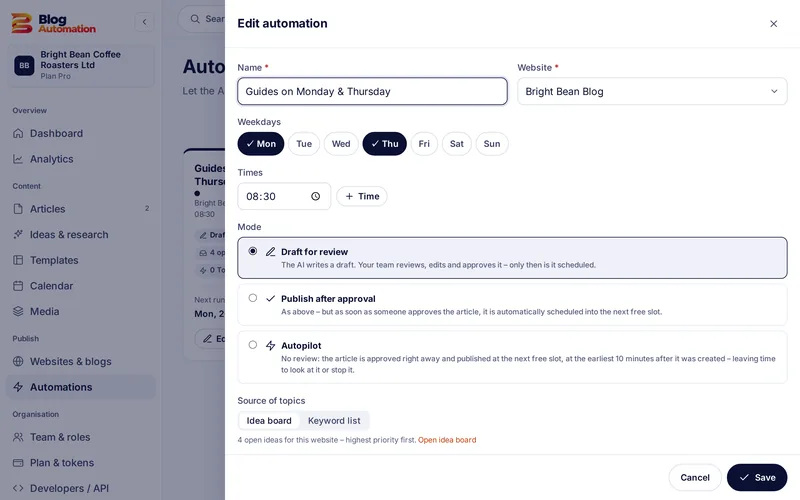
How to set up automated blog posting
- Pick a website: Every automation belongs to one connected WordPress website.
- Choose days and time: For example Mondays and Thursdays at 08:30. The website's time zone applies.
- Choose the source: Topics come from your idea board or from a keyword list.
- Choose mode and daily limit: "Draft for review" or "Publish after approval", plus the maximum number of posts per day.
The overview shows the next and the last run of every automation. After each run it says which post was created and that it is waiting for review.
Two modes for your blog
Draft for review: the automation writes the post and hands it to your team. You decide when it appears, in the calendar or in the post.
Publish after approval: here, too, the post waits for approval. As soon as someone with the "Approve" right has agreed, Blog Automation publishes it to WordPress without another click.
In both cases the basic setting "Always send AI posts to review first" applies. We recommend keeping it on.
Where the topics come from
The idea board collects topics with priority, focus keyword and target website. You add ideas yourself, or let "Find ideas with AI" make suggestions (2 tokens for one suggestion with several ideas). Ideas that have been used are marked "Used" on the board and link to the post. Alternatively you add a keyword list.
Daily limit and pause
Every website has a daily limit: at most as many posts per day as you set. That prevents "too much at once". Google treats pages generated in bulk without value for users as spam ("scaled content abuse" in its spam policies (external link)). A calm, reviewed rhythm fits much better with what Google recommends.
You can switch an automation off at any time, and pause a whole website in its settings. What this means for search is explained in our guide how to automate blog posts.
Common question: Do I need a specific plan for automations? Yes, automations are part of the Pro plan. In the Starter plan you schedule posts in the calendar and they are published automatically on the date.
Frequently asked questions
Does the automation publish posts without review?
Not as long as "Always send AI posts to review first" is on, which is the default. Even in the "Publish after approval" mode a post only goes live once someone in your team has approved it.
What does an automated post cost?
The same as a post you start yourself: 65 tokens, or 80 tokens with a featured image. The automation itself costs nothing extra. With your own AI key in the Pro plan there are no token costs.
Can I stop an automation for a while?
Yes. Every automation has its own switch. While it is off, no new drafts are created. To stop publishing on a whole website, pause the website in its settings.
Related features
- from Free
AI blog writer
From topic to draft in four steps, with brand voice, AI actions in the editor and a featured image.
Read more - from Free
Approval workflow
Draft, review, approval: with fixed and custom roles, rights per action and an activity log.
Read more - from Starter
Content calendar
Month and week view with a colour per website, the status of every post and scheduling of approved posts.
Read more
Ready for your first post?
Try Blog Automation with sample data
The demo opens at once, no sign-up needed. You see the dashboard, editor, calendar and approval just the way your team will use them.
The demo shows sample texts. The Free plan includes 200 tokens a month.