AI blog posts · WordPress · approval

AI drafts. Your team approves. WordPress publishes.

Blog automation for WordPress that keeps a person in charge: AI writes posts in your brand voice, your team reviews and approves, and the post goes live on schedule.

Opens instantly with sample data

Free plan, no credit cardBased in Frankfurt am MainHosted in Germany

  • Hosted in Germany
  • GDPR data processing agreement
  • Approval before publishing
  • Free plan with 200 tokens
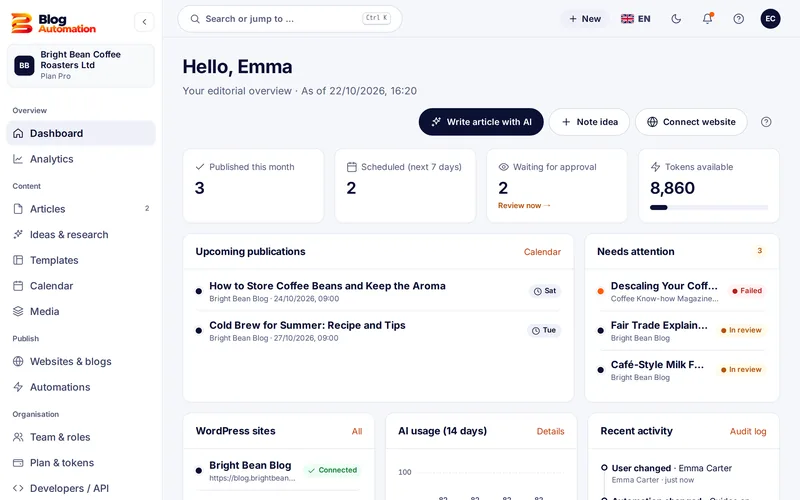
Blog Automation dashboard with scheduled posts, pending approvals and tokens
  • 65tokens per AI post, any length
  • 6fixed roles plus custom roles
  • 5WordPress websites in the Pro plan
  • $0for the Free plan to start

Live demo

Try Blog Automation right here

The real app with sample data: open posts, let the AI write, look at the calendar and approvals. Nothing is published, no sign-up needed.

app.blog-automation.comOpen in a new tab
Blog Automation dashboard with scheduled posts, pending approvals and tokens

On start, the demo loads from app.blog-automation.com and sets a technically necessary session cookie there. Nothing is loaded before.

How it works

Blog automation in four steps: from topic to post

  1. 01

    Connect WordPress

    Enter the address, paste an application password, test the connection. You do not need a plugin.

  2. 02

    Set your brand voice

    Tone, audience, form of address and a sample text: the AI follows them in every new post.

  3. 03

    Let AI write the post

    Enter topic and focus keyword, check the outline, create the draft. You see the token price first.

  4. 04

    Review and schedule

    Your team reads, edits and approves. Then you pick the date or let an automation handle it.

Features

Everything for a blog that keeps publishing

01

AI blog posts in your voice

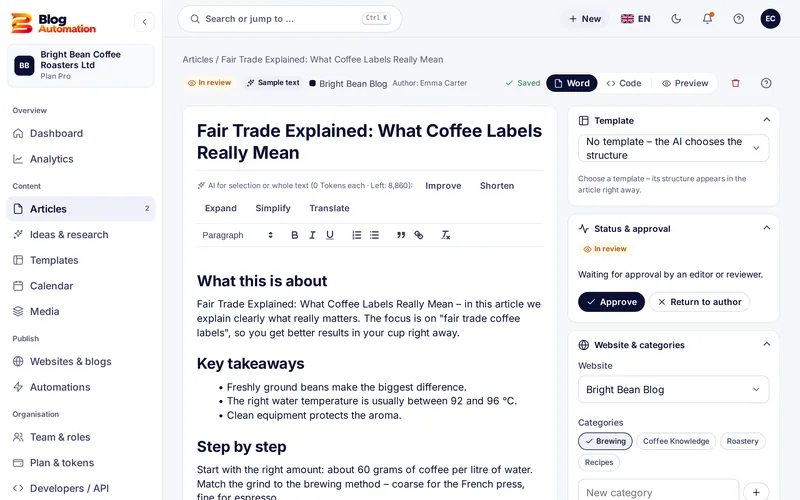
The assistant takes you from topic to finished draft in four steps. In the editor you improve, shorten, expand, simplify or translate single paragraphs or the whole text.

  • Brand voice with sample text and form of address
  • SEO suggestions for title, description and slug
  • Create a featured image with AI
AI blog writer
Post editor with AI actions, status and approval
02

Automations on fixed dates

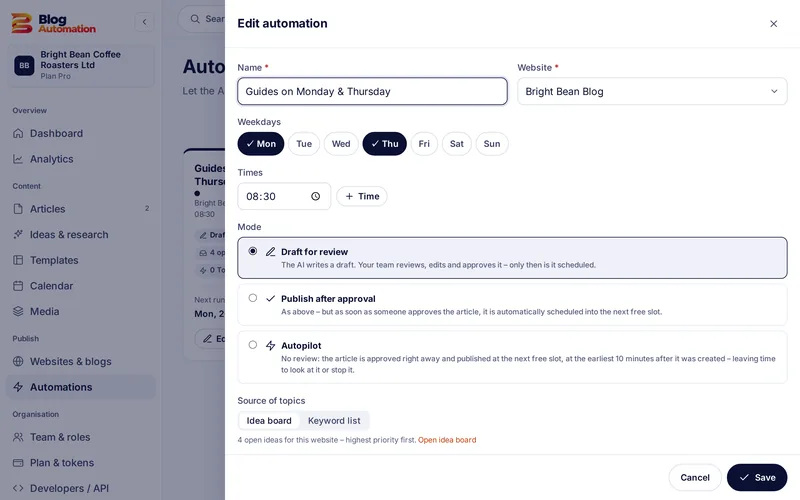
Choose weekdays and a time for each website. Blog Automation takes topics from the idea board or a keyword list and sends the drafts to your team for review.

  • Daily limit for every website
  • Draft for review or publish after approval
  • Pause at any time
Automations
Automation with weekdays, time and mode
03

Approval, not autopilot

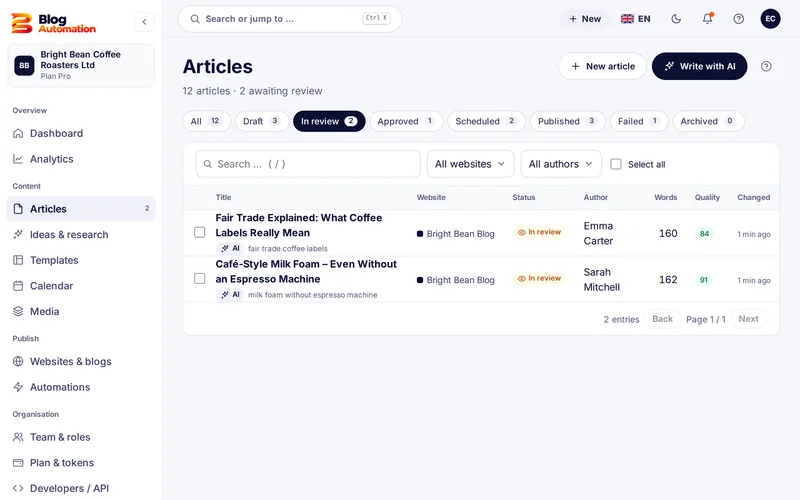
Every post goes through draft, review and approval. Roles decide who may approve. The activity log shows who changed what and when.

  • 6 fixed roles and custom roles
  • Rights down to area and action
  • E-mail when a post waits for you
Approval workflow
Post list with posts waiting for approval
04

Several WordPress websites

Connect up to 5 websites in the Pro plan. Categories and authors are loaded, and every website gets its own settings for status, category, time zone and calendar colour.

  • Connected with an application password
  • WordPress status: publish right away, draft or pending review
  • Test the connection any time
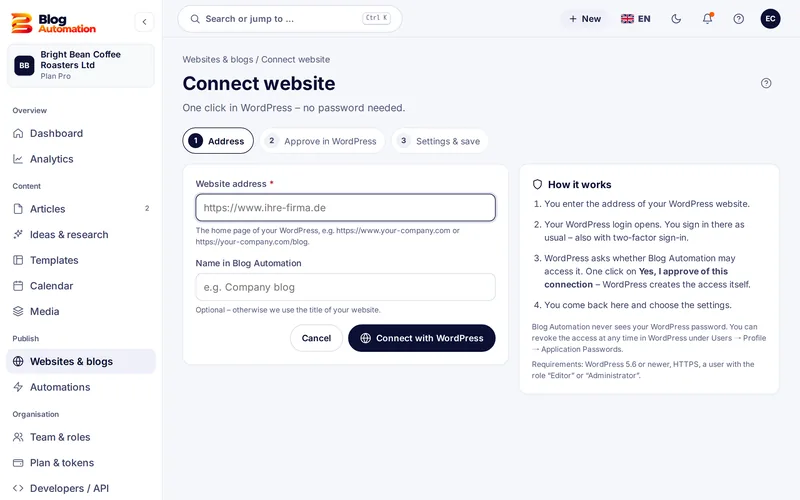
WordPress connection
Connecting a WordPress website in three steps

Content calendar

Every week at a glance

The content calendar shows scheduled, published and failed posts in a month or week view. Every website has its own colour, so gaps stand out at once.

Go to the content calendar

PublishedScheduledIn reviewDraft

Approval workflow

Review first, then publish

AI posts in Blog Automation go to review first. Only after approval can a post be scheduled or published automatically. Responsibility stays with your team.

  • Reviewers check facts, sources and author details
  • Send a post back to its author in one click
  • Activity log with person and time
  • E-mail notice when a post is waiting
Go to the approval workflow
Connecting a WordPress website in three steps

WordPress connection

No plugin needed

Blog Automation connects to WordPress through its REST API with an application password. Your normal password stays private, and you can revoke access in WordPress at any time.

  1. 1Enter the address
  2. 2Paste an application password
  3. 3Test the connection

Blog Automation works with WordPress only (version 5.6 or later, with HTTPS).

Go to the WordPress connection

Compared

Blog Automation and typical AI writing tools

Many AI tools write text. Blog Automation gets it reviewed and onto your WordPress website on time, from a provider based in Germany.

Blog Automation and typical AI writing tools
Blog AutomationTypical AI writing tools
HostingApplication and database in GermanyOften in the USA
Data processing agreement (Art. 28 GDPR)In every plan, including FreeNot with every provider
Approval before publishingDraft, review and approval with an activity logUsually not built in
WordPressPublish or schedule directly, no pluginCopy and paste, or install a plugin
CostFixed price in tokens, shown before every actionOften word or credit allowances without a fixed price per post
SupportIn German or English, by phone and e-mailOften chat or e-mail only
Contract partnerBusiness in Frankfurt am Main, German lawOften a provider outside the EU

A general comparison with typical offers on the market, not a test of individual products; individual providers may differ. For the AI features we use OpenAI as a processor, details on the page Sub-processors

Pricing

Start small, grow later

Start with the Free plan and switch when your blog grows. Every AI action has a fixed token price that you see before it starts.

Free

$0/ month
  • 200 tokens every calendar month
  • about 2 posts with image
  • 1 WordPress website
  • Draft and approval
  • Buy more tokens any time
Start free

Starter

$20/ month

plus VAT, cancel monthly

  • 2,000 tokens per month
  • about 25 posts with image
  • 1 website, 2 users
  • Calendar and auto-posting
  • Idea board
  • Tokens valid for 12 months
Choose Starter
Popular

Pro

$50/ month

plus VAT, cancel monthly

  • 5,000 tokens per month
  • about 62 posts with image
  • 5 websites, 5 users
  • Automations
  • Roles and approval workflow
  • Your own AI keys
  • Tokens valid for 12 months
Choose Pro

30-day money-back guarantee

You book Starter or Pro for the first time and it is not the right fit after all? E-mail us within 30 days of the first payment. We refund the plan price in full, no reasons needed. Your account continues on the Free plan and your data stays.

How the guarantee works

GDPR & security

Hosted in Germany, with a DPA

Your data stays in data centres in Germany, and WordPress credentials are stored encrypted. The AI providers work as processors; according to the app, your input is not used for training.

Go to GDPR & security
  • Hosted in GermanyApplication and database run in German data centres.
  • Data processing agreementAgreement under Art. 28 GDPR, available from support.
  • Encrypted credentialsWordPress credentials are stored with AES-256.
  • Log of every actionYou can see who did what and when.

Personal support

You talk to people in Frankfurt am Main

Blog Automation is made by Internet am Dornbusch in Frankfurt am Main, Germany. We build and run the application ourselves and answer your questions directly, without a call centre in between.

  • Phone and e-mail in German or English
  • Free help with setup and with switching
  • One contract partner in Germany, German law

How to reach us

Phone+49 69 34 87 77 44E-mailinfo@blog-automation.com

We usually answer on the same working day

Internet am Dornbusch, Eschersheimer Landstraße 297, 60320 Frankfurt am Main

FAQ

Frequently asked questions

Does Google detect AI content - and is that a problem?

Google says it rates the quality of content, not how it was produced. Pages generated in bulk without value for users count as spam. That is why AI posts in Blog Automation go to review first, and you add your own experience and sources.

Do I have to label AI content?

Since 2 August 2026 the EU AI Act requires AI-generated text that informs the public on matters of public interest to be labelled. This does not apply when the text has undergone human review and a person holds editorial responsibility. Approval in Blog Automation records who reviewed it and when. We recommend labelling AI images. This is not legal advice.

Do I need a WordPress plugin?

No. Blog Automation uses the WordPress REST API and an application password, available since WordPress 5.6. You need a website with HTTPS and a WordPress user with the Editor or Administrator role.

What are tokens?

Tokens are the currency for AI actions. A post costs 65 tokens whatever its length, a featured image 15 tokens. You see the price before every action. If an action fails, no tokens are charged.

Does Blog Automation work with systems other than WordPress?

No, currently only with WordPress 5.6 or later and HTTPS. Shopify, Wix, Webflow and other systems are not supported.

Can I change my plan later?

Yes. You can book, switch or cancel at any time; cancelling takes effect at the end of the billing period. Plan tokens from Starter and Pro and bought tokens stay valid for 12 months.

Will someone help me set it up?

Yes. Our team in Frankfurt am Main sets up Blog Automation with you for free if you like: connect WordPress, create the brand voice and write the first posts together, by phone or video call. More on the onboarding service page.

Ready for your first post?

Try Blog Automation with sample data

The demo opens at once, no sign-up needed. You see the dashboard, editor, calendar and approval just the way your team will use them.

Try the demo - no sign-upStart free

The demo shows sample texts. The Free plan includes 200 tokens a month.

Try the demo