
AI blog writerfrom Free
AI blog writer that sounds like your company
Enter a topic, check the outline, create the draft: the AI blog writer creates posts the way your company sounds. Before anything goes live, your team reads the text.
How the AI blog writer works
- Topic and focus keyword: Enter the topic, a focus keyword if you like, the target website and notes for the AI. You can also pick an idea from the idea board.
- Settings: In the second step you set up this particular post.
- Outline: If you want, the AI first creates an outline (2 tokens). You see the structure before the actual text is written.
- Draft: The AI writes the post for a flat 65 tokens, short or long. It lands as a draft in the editor and waits there for your team.
Brand voice: every post sounds like you
You set the brand voice once for your company. It applies to every new post and to automations.
- Tone and audience describe how you write and for whom.
- Form of address formal, informal or no direct address (for German: "Sie" or "Du").
- Default length short (about 600 words), medium (about 1,100 words) or long (about 1,800 words).
- Call to action at the end of the post, for example a pointer to your shop.
- Words the AI should avoid, such as terms that do not fit your brand.
- A sample text in your style of up to 4,000 characters. Please do not paste personal data.
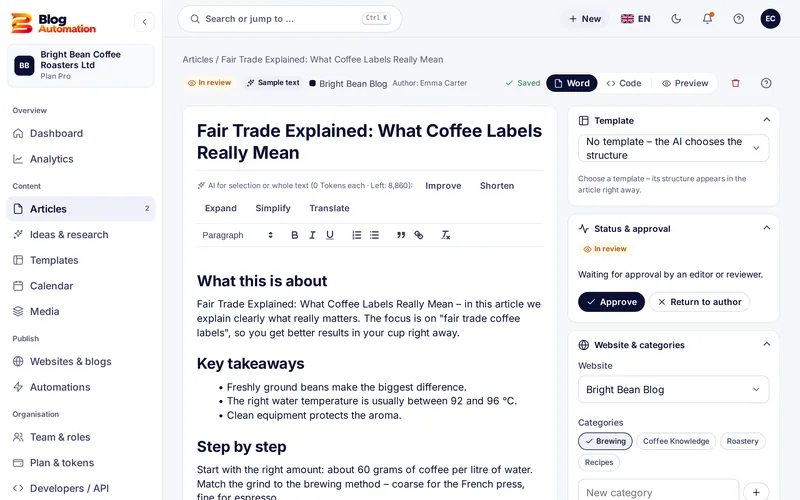
The editor: AI for single paragraphs
In the editor you select a paragraph or work on the whole text. The AI can improve, shorten, expand, simplify and translate, each for 2 tokens. You also get:
- SEO suggestions for title, description, slug and tags (2 tokens),
- a quality score and an overview of versions,
- categories, tags and excerpt, which Blog Automation transfers to WordPress as set,
- a featured image made with AI at 1536 × 1024 pixels (15 tokens) plus a field for the alt text.
Which AI writes the texts?
Texts are written with OpenAI gpt-6-astra, images with OpenAI gpt-image-2 in medium quality. In the Pro plan you can add your own keys from OpenAI, Anthropic (Claude), Google Gemini or an OpenAI-compatible provider. Whatever runs through your own key costs no tokens.
From draft to post
An AI draft is a start, not a finished post. Your team adds its own experience and checks the facts before approving. See how that works in the approval workflow. For fixed dates there is the content calendar.
Common question: Does an AI post go live right away? No. New AI posts go to review first by default. They are published only after someone with the "Approve" right has agreed.
Frequently asked questions
How long is an AI post?
You choose short, medium or long: about 600, 1,100 or 1,800 words. The price stays the same: a post costs 65 tokens, a post with a featured image 80 tokens. Google, by the way, does not prefer any word count; what matters is how useful the post is for your readers.
Can the AI write in German and English?
Yes. In the brand voice and for each website you choose German or English. In the editor you can also turn a finished text into the other language with the "Translate" action.
Can I give the AI my own text as a model?
Yes. In the brand voice you paste a sample text of up to 4,000 characters, and the AI follows its tone and sentence style. Personal data does not belong in this sample text.
Related features
- from Pro
Automations
Fixed dates per website, topics from the idea board or a keyword list, daily limit and review.
Read more - from Free
Approval workflow
Draft, review, approval: with fixed and custom roles, rights per action and an activity log.
Read more - from Starter
Content calendar
Month and week view with a colour per website, the status of every post and scheduling of approved posts.
Read more
Ready for your first post?
Try Blog Automation with sample data
The demo opens at once, no sign-up needed. You see the dashboard, editor, calendar and approval just the way your team will use them.
The demo shows sample texts. The Free plan includes 200 tokens a month.